NetSuite – Get specific Custom Record Types and related sub Custom Fields

NetSuite: Get specific Custom Record Types and related sub Custom Fields

image-20240509164300563

背景

以前当使用search.create({})来获取数据时,我们需要制定特定的数据返回列;例如:search.createColumn(options)

而query可以使用 SELECT * FROM 来动态返回所有的数据列(这在有的时候是一个优点),那么如何让search也动态返回所有的数据列呢?

SELECT CF.ScriptID , *
         FROM CustomField CF left join CustomRecordType on CF.recordtype = CustomRecordType.internalid
                 Where CF.ScriptID like UPPER('%CUSTRECORD_test%')
                    # ScriptID这个地方,sql系统返回的全部是大写字母,所以检索时也要用大写字母检索

var arrColFlds = query.runSuiteQL({
query: `SELECT CF.ScriptID scriptid
FROM CustomField CF left join CustomRecordType on CF.RecordType = CustomRecordType.internalid Where CustomRecordType.scriptid = ‘CUSTOMRECORD_1’ and CF.ScriptID like ‘CUSTRECORD%’ `
}).asMappedResults();

以上这个query就可以返回Record Type为CUSTOMRECORD_1的所有自定义字段。

如果你需要所有系统中的Custom Record Types

SELECT
    Name,
    ScriptID,
    InternalID,
    Description,
    BUILTIN.DF( Owner ) AS Owner,
    AllowQuickSearch,
    AllowInlineEditing,
    AllowAttachments
FROM
    CustomRecordType
ORDER BY
    Name

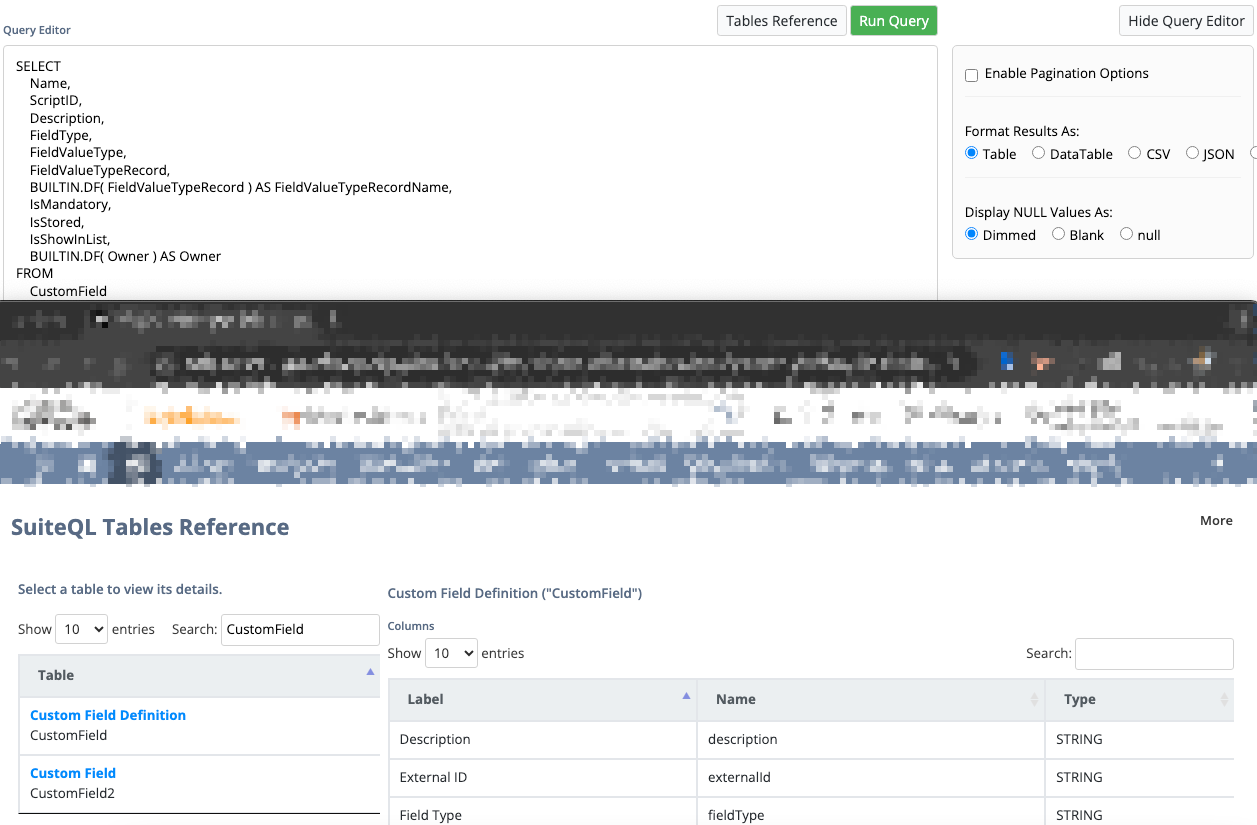
可以它对应的数据库表:CustomRecordType, 而保存自定义字段的数据库表名:CustomField

如果你需要所有系统中的Custom Fields

SELECT
    Name,
    ScriptID,
    Description,
    FieldType,
    FieldValueType,
    FieldValueTypeRecord,
    BUILTIN.DF( FieldValueTypeRecord ) AS FieldValueTypeRecordName,
    IsMandatory,
    IsStored,
    IsShowInList,
    BUILTIN.DF( Owner ) AS Owner
FROM
    CustomField

题外话

如果是在Client端,又不想使用query的情况下;可以用ajax访问抓取Record Catalog,速度会比较慢,抓取所有的自定义表和详细的子自定义字段。

var rcEndpoint = ‘/app/recordscatalog/rcendpoint.nl’; var recordTypes; var action = ‘getRecordTypes’; var data = encodeURI( JSON.stringify( { structureType: ‘FLAT’ } ) ); var url = rcEndpoint + ‘?action=’ + action + ‘&data=’ + data; var xhr = new XMLHttpRequest();
xhr.open( ‘get’, url, false );
xhr.send();

recordTypes = JSON.parse( xhr.response );
console.log( JSON.stringify( recordTypes, null, 5 ) ); var schema = [];
recordTypes.data.forEach( function( recordType ) {

console.log( 'Loading details for record type ' + recordType.id + '...' );    action = 'getRecordTypeDetail';
data = encodeURI( JSON.stringify( { scriptId: recordType.id, detailType: 'SS_ANAL' } ) ); var url = rcEndpoint + '?action=' + action + '&data=' + data; var xhr = new XMLHttpRequest();
xhr.open( 'get', url, false );
xhr.send();
recordDetail = JSON.parse( xhr.response );    
schema.push( recordDetail.data );

});
console.log( JSON.stringify( schema, null, 5 ) );

总结

结合上面的两个query,我们可以把两个表join起来,用来查询特定Record Type的自定义字段:

var arrColFlds = query.runSuiteQL({
query: `SELECT CF.ScriptID scriptid
FROM CustomField CF left join CustomRecordType on CF.RecordType = CustomRecordType.internalid Where CustomRecordType.scriptid = ‘CUSTOMRECORD_1’ and CF.ScriptID like ‘CUSTRECORD%’ `
}).asMappedResults();

Limitation

这样检索,依然无法查询到那些自定义Record Type下的Custom Field被inactive的字段。

目前唯一的办法就是按 select CustomField, 然后order by id以后 然后去猜下一个id的号码,如果猜对UI就是显示出这个custom field 的设置页面,否者报错:You are not allowed to access this custom field.

SELECT
    CustomField.description,
    CustomField.externalId,
    CustomField.fieldType,
    CustomField.internalId,
    CustomField.id,
    CustomField.name,
    CustomField.lastModifiedDate,
    CustomField.fieldValueTypeRecord,
    CustomField.isMandatory,
    CustomField.owner,
    CustomField.recordType,
    CustomField.scriptid,
    CustomField.isShowInList,
    CustomField.isStored,
    CustomField.fieldValueType,
FROM
    CustomField
    order by id
#WHERE recordType = 835
#这个recordType(注意大小写,suitequery对大小写敏感)就是指定了Record Type的internalid数字

Netsuite Technical Analyst 技术咨询开发服务

image-20240518215819699

NetSuite Build-In Error Message: The record has been deleted since you have retrieved it.-CarlZeng

Background: In my scenario. When we do transform record, some time NetSuite throw (USER ERROR) error message about: The record has been deleted since

Background:

In my scenario.  When we do transform record, some time NetSuite throw (USER ERROR) error message about:

The record has been deleted since you have retrieved it.

Troubleshooting:

Since the script is called from RESTLET, we can alocated the issue by simulated it:

  1. Testing trigger/call RestLet ->
  2. RestLet executed, and it tring to save a Item Receipt(for example), try catch found the error at save() function ->
  3. Transaction’s save function triggered User Event script(s) -> Before Load -> Before Submit -> After Submit
  4. Comment out a user event’s before load then re-test, everything integrated and works good.
  5. Finally, the problem isolated at Before Load, a default value is not valid in this account.  [Fix the drop down value]
  6. (Note: same code works in User Interface, but, in above scenairo script DOESN”T works.)

Summary:

Error: Failed to create Item Receipt. Message:

Items you have requested in the record have been deleted since you retrieved the form

Think about the case when you saw this build-in NetSuite error message:

  • You might set an invalid value to a field.
  • You might try seting a non-available field’s value

NetSuite Batch Process Status -CarlZeng

Check of back-end process status which might impact reporting, learn how things are calculate/processing in NetSuite

/app/accounting/bulkprocessing/bulkprocessingstatuslist.nl

[
{ “value”: “@ALL@”, “text”: “- All -” },
{ “value”: “SUPPLYREALLOCATION”, “text”: “Allocate Orders” },
{ “value”: “ALLOCATEREVARRANGEMENT”, “text”: “Allocate Revenue Arrangements” },
{ “value”: “BULKAUTHCOMMISSN”, “text”: “Authorize Commissions” },
{ “value”: “BULKAUTHPARTNERCOMMISSN”, “text”: “Authorize Partner Commissions” },
{ “value”: “AUTO_CASH”, “text”: “Auto Cash” },
{ “value”: “AUTO_POST_GL_TRANSACTION”, “text”: “Auto-Create GL Transactions” },
{ “value”: “BALANCELCGACCOUNTS”, “text”: “Balance Location Costing Group Accounts” },
{ “value”: “BAL_SEGMENTS_KEY_REDUCTN”, “text”: “Balancing by Segments: Analysis data processing” },
{ “value”: “BAL_SEGMENTS_KEY_STAGING”, “text”: “Balancing by Segments: Transaction analysis” },
{ “value”: “BAL_SEGMENTS_TRX_GENERAT”, “text”: “Balancing by Segments: Transaction generation” },
{ “value”: “BANK_CONNECTIVITY_IMPORT”, “text”: “Bank Connectivity Import” },
{ “value”: “BANK_STATEMENT_IMPORT”, “text”: “Bank Statement Import” },
{ “value”: “BILLINBOUNDSHIPMENT”, “text”: “Bill Inbound Shipment” },
{ “value”: “BILLINGWORKCENTER”, “text”: “Billing Work Center” },
{ “value”: “BUILDWORKORDERS”, “text”: “Build Work Orders” },
{ “value”: “SUBSCRIPTION_MRR”, “text”: “Calculate and store MRR analytics for {Subscription Line}” },
{ “value”: “UPDATEDCLOSED”, “text”: “Calls Update Dclosed” },
{ “value”: “CANCELSUPPLYORDER”, “text”: “Cancel Supply Orders” },
{ “value”: “CLOSEWORKORDERS”, “text”: “Close Work Orders” },
{ “value”: “ORDERREALLOCATION”, “text”: “Commit Orders” },
{ “value”: “COMPLETEWORKORDERS”, “text”: “Complete Work Orders” },
{ “value”: “CONFIRM_TRANSACTIONS”, “text”: “Confirm Transactions” },
{ “value”: “COPYITEMLOCCONFIG”, “text”: “Copy Item Location Configuration” },
{ “value”: “RECOGNIZEPLANNEDEXPENSE”, “text”: “Create Advanced Expense Journal Entries” },
{ “value”: “RECOGNIZEPLANNEDREVENUE”, “text”: “Create Advanced Revenue Recognition Journal Entries” },
{ “value”: “CHARGEENGINE”, “text”: “Create Charges” },
{ “value”: “OFFCYCLEINVOICE”, “text”: “Create Off-Cycle {#Invoices#}” },
{ “value”: “CREATEPERIODENDJOURNALS”, “text”: “Create Period End Journals” },
{ “value”: “BULKREVREC”, “text”: “Create Revenue Recognition Journal Entries” },
{ “value”: “RECOGNIZEREVENUE”, “text”: “Create Summarized Rev Rec Journal Entries” },
{ “value”: “CREATESUPPLYCHANGEORDER”, “text”: “Create Supply Change Orders” },
{ “value”: “DEFERREDREVENUERECLASS”, “text”: “Deferred Revenue Reclassification” },
{ “value”: “DELETEREVENUEELEMENTS”, “text”: “Delete Revenue Elements” },
{ “value”: “DELETEPLANDEFINITION”, “text”: “Delete Supply Plan Definition” },
{ “value”: “EDITREVENUEARRANGEMENTS”, “text”: “Edit Revenue Arrangements” },
{ “value”: “TESTUNEXPECTEDERRORTYPE”, “text”: “Error Handling Test” },
{ “value”: “EXECUTERECORDACTIONS”, “text”: “Execute Record Actions” },
{ “value”: “EXTEND_EST_REVREC_ENDDATE”, “text”: “Extend Subscription Estimated Rev Rec End Date” },
{ “value”: “FIRMPLANNEDORDER”, “text”: “Firm Planned Orders” },
{ “value”: “FIXREVRECTRANSACTIONS”, “text”: “Fix Rev Rec Transactions” },
{ “value”: “FULFILLSALESORDERS”, “text”: “Fulfill Sales Orders” },
{ “value”: “GLAUDITNUMBERING”, “text”: “GL Audit Numbering” },
{ “value”: “GLIMPACTADJUSTMENT”, “text”: “GL Impact Adjustment” },
{ “value”: “GROUPINVOICES”, “text”: “Group Invoices” },
{ “value”: “GROUPINVOICESSUBMISSION”, “text”: “Group Invoices Submission” },
{ “value”: “IMPORT_EMPLOYEE_EXPENSE”, “text”: “Import Employee Expenses” },
{ “value”: “INTERCOMPANYELIMINATION”, “text”: “Intercompany Elimination” },
{ “value”: “IC_ENTITY_GENERATION”, “text”: “Intercompany Entity Generation” },
{ “value”: “INTERCOORDER_GENERATION”, “text”: “Intercompany Order Generation” },
{ “value”: “ICORDER_RA_GENERATION”, “text”: “Intercompany Order Generation” },
{ “value”: “ICORDER_SO_GENERATION”, “text”: “Intercompany Order Generation” },
{ “value”: “INVOICEBILLABLECUSTOMERS”, “text”: “Invoice Billable Customers” },
{ “value”: “BILLSALESORDERS”, “text”: “Invoice Sales Orders” },
{ “value”: “OFFCYCLECREDITMEMO”, “text”: “Issue Credit Memo from Change Order” },
{ “value”: “ISSUECREDITMEMOS”, “text”: “Issue Credit Memos” },
{ “value”: “ISSUEWORKORDERS”, “text”: “Issue Work Orders” },
{ “value”: “BULKITEMSHIPSTATUSPACK”, “text”: “Mark Orders Packed” },
{ “value”: “BULKITEMSHIPSTATUSSHIP”, “text”: “Mark Orders Shipped” },
{ “value”: “MARKVSOEDELIVERED”, “text”: “Mark VSOE Delivered” },
{ “value”: “MARKBUILTWORKORDERS”, “text”: “Mark Work Orders Built” },
{ “value”: “MARKFIRMEDWORKORDERS”, “text”: “Mark Work Orders Firmed” },
{ “value”: “MARKRELEASEDWORKORDERS”, “text”: “Mark Work Orders Released” },
{ “value”: “CREATEWORKORDERSFORSTOCK”, “text”: “Mass Create Work Orders” },
{ “value”: “MATERIALREQUIREMENTSPLAN”, “text”: “Material Requirements Planning” },
{ “value”: “MEDIATEPLANRATABLEEVENTS”, “text”: “Mediate Revenue Plan Ratable Events” },
{ “value”: “MEMORIZEDTRANSACTIONS”, “text”: “Memorized Transactions” },
{ “value”: “MHATTRIBUTE”, “text”: “Merchandise Attribute” },
{ “value”: “MHITEMASSIGNMENT”, “text”: “Merchandise Item Assignment” },
{ “value”: “MHITEMREMOVAL”, “text”: “Merchandise Item Removal” },
{ “value”: “MERGEREVARRANGEMENT”, “text”: “Merge Revenue Arrangements for Linked Sources” },
{ “value”: “MIGRATEOPENREVTRANSACTION”, “text”: “Migrate Revenue Arrangements and Plans” },
{ “value”: “MONTHENDFXREVAL”, “text”: “Month End Currency Revaluation” },
{ “value”: “MRPINITIALIZATION”, “text”: “MRP Initialization” },
{ “value”: “MRPOLDDATADELETION”, “text”: “MRP Old Data Deletion” },
{ “value”: “BULKORDERITEMS”, “text”: “Order Items” },
{ “value”: “PICKACTION_SYNC”, “text”: “Order Release Fulfillment” },
{ “value”: “BULKORDERREQUISITIONS”, “text”: “Order Requisitions” },
{ “value”: “OWNERSHIPTRANSFER”, “text”: “Ownership Transfer” },
{ “value”: “BULKPAYBILLS”, “text”: “Pay {#Bills#}” },
{ “value”: “REPOSITORYINITIALIZATION”, “text”: “Planning Repository Initialization” },
{ “value”: “PLANNINGREPOSITORYREFRESH”, “text”: “Planning Repository Refresh” },
{ “value”: “SUBSCRIPTION_RECURRINGAMT”, “text”: “Populate Recurring Amount for {Subscription Line}” },
{ “value”: “PROCESSHISTTRANSACTIONS”, “text”: “Process Secondary Book Historical Transactions” },
{ “value”: “RATINGRUN”, “text”: “Rating Run” },
{ “value”: “RECALCEXPFORECASTPLANS”, “text”: “Recalculate Expense Forecast Plans” },
{ “value”: “RECALCREVFORECASTPLANS”, “text”: “Recalculate Revenue Forecast Plans” },
{ “value”: “RECEIVEINBOUNDSHIPMENT”, “text”: “Receive Inbound Shipment” },
{ “value”: “BULKRECEIVEORDER”, “text”: “Receive Orders” },
{ “value”: “RELEASEPLANNEDORDER”, “text”: “Release Planned Orders” },
{ “value”: “REMOVEMATRIXOPTIONS”, “text”: “Remove Matrix Options” },
{ “value”: “RENEWSUBSCRIPTIONS”, “text”: “Renew {#Subscriptions#}” },
{ “value”: “RESCHEDULESUPPLYORDER”, “text”: “Reschedule Supply Orders” },
{ “value”: “REVALUESTDCOSTINVENTORY”, “text”: “Revalue Standard Cost Inventory” },
{ “value”: “REVERTEXPFORECASTPLANS”, “text”: “Revert Expense Forecast Plans to Original” },
{ “value”: “REVERTFORECASTPLANSTOORIG”, “text”: “Revert Revenue Forecast Plans to Original” },
{ “value”: “ROLLUPITEMCOST”, “text”: “Rollup Planned Standard Cost” },
{ “value”: “REC_MATCHING_ENGINE”, “text”: “Run Rules Engine” },
{ “value”: “SUITETAXMIGRATION”, “text”: “SuiteTax Migration” },
{ “value”: “SUPPLYALLOCATIONMIGRATION”, “text”: “Supply Allocation Migration” },
{ “value”: “SCSNAPSHOTREFRESH”, “text”: “Supply Chain Snapshot Refresh” },
{ “value”: “TIME_MODIFICATION”, “text”: “Time Modification” },
{ “value”: “REPLENISHINVENTORY”, “text”: “Transfer Order Replenishment” },
{ “value”: “WITHDRAWINVENTORY”, “text”: “Transfer Order Withdrawal” },
{ “value”: “MANAGEACTUALEXPENSEPLANS”, “text”: “Update Actual Expense Plans” },
{ “value”: “MANAGEACTUALREVENUEPLANS”, “text”: “Update Actual Revenue Recognition Plans” },
{ “value”: “TESTBULKPROCTYPE”, “text”: “Update Department Name For Testing Only” },
{ “value”: “UPDATEEXPENSEPLANS”, “text”: “Update Expense Plans” },
{ “value”: “MANAGEFORECASTEXPPLANS”, “text”: “Update Forecast Expense Plans” },
{ “value”: “MANAGEFORECASTREVPLANS”, “text”: “Update Forecast Revenue Recognition Plans” },
{ “value”: “MANAGEREVENUEARRANGEMENT”, “text”: “Update Revenue Arrangements” },
{ “value”: “MANAGEREVENUEELEMENTS”, “text”: “Update Revenue Elements” },
{ “value”: “UPDATEREVRECPLANS”, “text”: “Update Revenue Recognition Plans” }
]

NetSuite query SQL

Netsuite query SQL

SELECT
    --top 10
    custbody_pri_prj projectid,
    max(trandate),
    max(trandisplayname),
    max(memo),
    max(type),
    --trandisplayname,
    --*
from transaction
where custbody_pri_prj is not null
    and trandate >= to_date(add_months(CURRENT_DATE, -6))
group by custbody_pri_prj

Statement used in Saved Search:

CASE WHEN {quantity}-{custcol_pri_fgt_cntr_direct_imp_total} > 0 THEN
CASE WHEN {custcol_pri_fgt_cntr_direct_imp_poloc} IS NOT NULL THEN 
'<a class="dottedlink" href="/app/accounting/transactions/purchord.nl?whence=&custbody_pri_fgt_cntr_direct_imp_so='|| REGEXP_REPLACE(, '_d+', '') || '&entity='|| {custcol_pri_fgt_cntr_po_vendor.id} ||'&location='|| {custcol_pri_fgt_cntr_direct_imp_poloc.id} ||'&custbody_pri_frgt_loc_ult='|| {location.id}|| '">Generate PO</a>'
ELSE
'Not Applicable'
END
ELSE
'Fully Generated'
END

NetSuite Test Driver Account 如何查看系统邮件发送历史记录

NetSuite Test Driver Account 在系统中很多时候无法正常发邮件到邮箱的。
比如:订单的通知邮件,定时邮件,email API发送的邮件。如何查看测试账户发送出来的邮件呢?

NetSuite Test Driver Account无法正常发邮件到邮箱系统

NetSuite的Account ID 类似于:tstdrv1030xxx,这样类型的账户都是测试账户,
测试账户的局限性有很多,待补充

查看测试账户发送出去的邮件

URL地址:
https://[NetSuiteAccountId].app.netsuite.com/app/email/sentemaillist.nl?whence=

修改一下上面这个URL地址中的[NetSuiteAccountId], 就可访问到系统发送的邮件列表。
访问目录:Setup > Company > Sent Email List

NETSUITE ERROR: Invalid department reference key 24 及类似错误的处理办法-CarlZeng

NETSUITE ERROR: Invalid department reference key 24 处理办法: 分析原因,1,这个24的internalid for Field department 是肯定有的,而系统却给出了出错提示, 说明系统在做类似下拉菜单选中department为24的部门的时候 出现了无法选择的项 , 所以系统认为这个下拉框中没有内容, so error popup….

NETSUITE ERROR: Invalid department reference key 24

处理办法:

分析原因,1,这个24的internalid for Field department 是肯定有的,而系统却给出了出错提示, 说明系统在做类似下拉菜单选中department为24的部门的时候 出现了无法选择的项 , 所以系统认为这个下拉框中没有内容, so error popup..

如果造成这种情况 ,说明有可能系统中的某个字段控制了这个字段中的下拉列表框内容,需要把 优先级高的字段赋值以后才可以来给这个department字段来赋值。

笔者这里的问题 是因为在 直接CreateRecord 未给出字段subsidiary 的内容。

record.setFieldValue(‘subsidiary’,1);
record.setFieldValue(‘department’,’24’); 这样就不会再出错了 。。 其他字段类似如此。

zeng.cz 20090611

More about NetSuite SDF manifest.xml and deploy.xml-CarlZeng

SDF的xml文件

Sample for manifest.xml

<manifest projecttype="ACCOUNTCUSTOMIZATION">

 <projectname>Business Process Automation</projectname>

 <frameworkversion>1.0</frameworkversion>

 <dependencies>

 <features>

 <feature required="false">CREATESUITEBUNDLES</feature>

 <feature required="true">SERVERSIDESCRIPTING</feature>

 <feature required="false">ADVRECEIVING</feature>

 <feature required="false">ASSEMBLIES</feature>

 <feature required="false">INVENTORY</feature>

 <feature required="false">PAYABLES</feature>

 <feature required="false">RECEIVABLES</feature>

 <feature required="false">CUSTOMTRANSACTIONS</feature>

 <feature required="false">MULTILOCINVT</feature>

 <feature required="false">OPPORTUNITIES</feature>

 <feature required="false">EXPREPORTS</feature>

 <feature required="false">ACCOUNTING</feature>

 <feature required="false">CRM</feature>

 <feature required="true">CUSTOMRECORDS</feature>

 <feature required="false">MATRIXITEMS</feature>

 <feature required="false">WEBSTORE</feature>

 <feature required="false">WORKORDERS</feature>

 </features>

 <objects>

 <object>customlist_backorder_status</object>

 </objects>

 <files>

 <file>/SuiteScripts/ProjectName/Script1.js</file>

 <file>/SuiteScripts/ProjectName/Script2.js</file>

 </files>

 </dependencies>

</manifest>

Sample for deply.xml

<deploy>

<configuration>

 <path>~/AccountConfiguration/*</path>

 </configuration>

 <files>

 <path>~/FileCabinet/ProjectName/*</path>

 </files>

 <objects>

<!--  <path>~/Objects/*</path>  -->

 <path>~/Objects/customrecord_record1.xml</path>

 </objects>

</deploy>

Careful on the sequence of deploy, separate to multiple round will minimum the dependency issues.

See detail usage sample in previous article :

How to use NetSuite SDF CLI, CLI for Node.js on Mac, suitecloud command

—–DOWNLOAD——————————————————————————–

(mkdir SDF_Top)

cd SDF_Top

suitecloud project:create -i

– Created new project(SDF_Test1), it will create new folder under SDF_Top with project name: SDF_Test1.

cd SDF_Test1

suitecloud account:setup

Now this folder is the main project folder

suitecloud object:import -i

? Do you want to import all object types? Yes

? Do you want to enter a script ID to filter your list? Yes

? Enter the full or partial script ID. _track

? Select the objects you want to import (Press to select, to toggle all, to invert selection)

—–UPLOAD——————————————————————————–

suitecloud account:setup

Create a new authentication ID (authID).

suitecloud project:adddependencies

suitecloud project:validate

The validation process has finished.

suitecloud project:deploy

Installation COMPLETE

Error handling

—–Validation failed——————————————————————————–

An error occurred during custom object validation. (customscript_scriptinternalid)
Details: The file reference /SuiteScripts/Project_Name/ScriptFileName.js is missing in the project and also not included in the dependencies list.

File: ~/Objects/customscript_ScriptFileName.xml
  1. Upload Files(Deploy files)

2. Deploy Script Records

2.1 Update manifest.xml to enable the dependency for all files section(see Sample for manifest.xml above), MODIFY it to add depenency objects, sometime it’s  custom objects(transaction body fields, line item fields or custom entity fields, record types, etc), sometimes it’s , add detail referenced files to this section when validation message is error out.

2.2 Update deploy.xml to enable the specific objects section ONLY. It will helps isolate.

2.3 suitecloud project:deploy

报错There is no JAR file in your CLI

WebstormProjects % suitecloud project:create -i                                          
? Select the project type you want to create. Account Customization Project                                  
? Enter the project name. CLQ_restFileAttach                                                                 
? Do you want to include unit testing with the Jest testing framework? ***This will install NPM module       
dependencies. No                                                                                             
Creating the project structure...                                                                            
There is no JAR file in your CLI for Node.js. Run "npm install" from "/usr/local/lib/node_modules/@oracle/sui
tecloud-cli" to install the JAR file.  

按指示去安装JAR

suitecloud-cli % npm install                                                             
npm error code EACCES                                                                                        
npm error syscall mkdir                                                                                      
npm error path /usr/local/lib/node_modules/@oracle/suitecloud-cli/node_modules/jest                          
npm error errno -13                                                                                          
npm error [Error: EACCES: permission denied, mkdir '/usr/local/lib/node_modules/@oracle/suitecloud-cli/node_m
odules/jest'] {                                                                                              
npm error   errno: -13,                                                                                      
npm error   code: 'EACCES',                                                                                  
npm error   syscall: 'mkdir',                                                                                
npm error   path: '/usr/local/lib/node_modules/@oracle/suitecloud-cli/node_modules/jest'                     
npm error }                                                                                                  
npm error                                                                                                    
npm error The operation was rejected by your operating system.                                               
npm error It is likely you do not have the permissions to access this file as the current user               
npm error                                                                                                    
npm error If you believe this might be a permissions issue, please double-check the                          
npm error permissions of the file and its containing directories, or try running                             
npm error the command again as root/Administrator.                                                           
npm error A complete log of this run can be found in: /Users/carlzeng/.npm/_logs/2025-11-11T04_01_06_568Z-deb
ug-0.log 
suitecloud-cli % sudo -i                                                                 
Password:                                                                                                    
MacBookPro:~ root# cd /usr/local/lib/node_modules/@oracle/suitecloud-cli                                     
MacBookPro:suitecloud-cli root# npm install                                                                  
npm warn deprecated [email protected]: This module is not supported, and leaks memory. Do not use it. Check out 
lru-cache if you want a good and tested way to coalesce async requests by a key value, which is much more com
prehensive and powerful.                                                                                     
npm warn deprecated [email protected]: Glob versions prior to v9 are no longer supported                            

> @oracle/[email protected] postinstall                                                                   
> node postinstall.js                                                                                        


added 249 packages, and audited 307 packages in 34s   

无奈, 只能重装:

sudo npm install -g --acceptSuiteCloudSDKLicense @oracle/suitecloud-cli 
suitecloud --version                                                  
3.1.0                                      

Javascript如何压缩JSON数据及应用

Javascript如何压缩JSON数据及应用, 用于在HTTP传输中压缩数据, 提升传输效率

有什么用

抛砖引玉, 仅先以接口传输中的HTTP传输, 来谈为什么要压缩数据? 有什么用?

比如: 压缩数据, 可以是POST的body中需要传输的JSON数据包变小, 数据变少. 从而实现更高效的传输

这与本声HTTP传输中的, HTTP 传输内容的压缩 有不同之处, 一个是在协议层面上对数据进行压缩; 而本文要谈的是在特定的HTTP接口环境下, 使用自定义的压缩方式.

​ 假如存在二者同时混用的情况下, 是否会让数据的解压缩发生异常, 或者数据的二次压缩是否导致其他的异常, 不再本文的讨论范围内.

怎么用

使用pako库解压gzip字符串的步骤如下:

  1. 导入pako库:可以使用<script>标签将pako库直接引入到HTML页面中,也可以使用npm安装并在JavaScript文件中使用import语句导入。

  2. 解压字符串:使用pako.inflate()方法对gzip格式的字符串进行解压缩。该方法的参数为一个Uint8Array类型的数据,需要将gzip格式的字符串转换为Uint8Array类型的数据。

// 压缩JSON数据
var data = JSON.stringify({message: 'hello world'});
var compressed = pako.deflate(data, {to: 'string'});


// 解压缩JSON数据
var decompressed = pako.inflate(compressed, {to: 'string'});
var json = JSON.parse(decompressed);
console.log(json.message); // 输出 "hello world"

相关内容

实现方法

NetSuite引入pako库

待实例测试的pako库

https://github.com/nodeca/pako/blob/master/dist/pako_deflate.es5.js

https://github.com/nodeca/pako/blob/master/dist/pako.js

https://github.com/nodeca/pako/blob/master/dist/pako_deflate.js

NetSuite调用压缩函数

Sometime you can wish to work with strings. For example, to send stringified objects to server. Pako’s deflate detects input data type, and automatically recode strings to utf-8 prior to compress. Inflate has special option, to say compressed data has utf-8 encoding and should be recoded to javascript’s utf-16.

const pako = require('pako');

const test = { my: 'super', puper: [456, 567], awesome: 'pako' };

const compressed = pako.deflate(JSON.stringify(test));


const restored = JSON.parse(pako.inflate(compressed, { to: 'string' }));

灵感来源

如何在JSON中进行数据压缩和解压缩?

HTTP 传输内容的压缩

js解压gzip字符串方法:  js怎么解压gzip字符串?

https://github.com/nodeca/pako

Javascript 加解密-CarlZeng

加密解密Javascript

加密:

var code='nlapiGetFieldValue("entity");';  
var encpt='';

for(var i=1;i<=code.length;i++){  
var c=String.fromCharCode(code.charCodeAt(i-1)+code.length);  
encpt+=escape(c);//c;//  
}

encpt

-----------------------------------------------------------------  
"[%85%83x%87%80%5E%7C%8B%5D%80%7C%83%7Bmx%83%8C%7C%3F99@R](mailto:…ƒx‡€^|‹]€|ƒ{mxƒŒ|?99@R)"  
%8B%89%7E%8D%86d%82%91c%86%82%89%81s%7E%89%92%82E%3F%82%8B%91%86%91%96%3FFX  
-----------------------------------------------------------------

解密:

var code="%8B%89%7E%8D%86d%82%91c%86%82%89%81s%7E%89%92%82E%3F%82%8B%91%86%91%96%3FFX";  
code=unescape(code);  
decpt='';  
for(var i=1;i<=code.length;i++){  
var c=String.fromCharCode(code.charCodeAt(i-1)-code.length);  
decpt+=c;  
}

decpt

%u010F%u010D%u0102%u0111%u010A%F4%u0106%u010F%u0105%E6%u010E%u0102%u010A%u010D%C9%u010F%u010D%u0102%u0111%

u010A%E8%u0106%u0115%F6%u0114%u0106%u0113%C9%CA%CD%C3%u0104%u0109%u0102%u010F%u0108%D2%D4%u0102%u0103%u0104%

u0105%E1%u0114%u0110%u0109%u0116%CF%u0104%u0110%u010E%C3%CD%C3%E5%E6%E3%F6%E8%C3%CD%u010F%u010D%u0102%u0111%

u010A%E8%u0106%u0115%F3%u0110%u010D%u0106%C9%CA%CC%C3%u0100%C3%CC%u0108%u0106%u0115%E4%u0110%u0110%u010C%

u010A%u0106%C9%C3%EB%F4%E6%F4%F4%EA%F0%EF%EA%E5%C3%CA%CD%C3%u011B%u0106%u010F%u0108%CF%u0104%u0109%u0116%

u0102%u010F%u011B%u0109%u0116%u0110%E1%u0115%u0110%u0115%u0106%u010E%u0114%u0116%u010A%u0115%u0106%CF%u0104%

u0110%u010E%C3%CD%C3%u0104%u0109%u0102%u010F%u0108%D2%D4%u0102%u0103%u0104%u0105%E1%u0108%u010E%u0102%u010A%

u010D%CF%u0104%u0110%u010E%C3%CA%DC

try{var oS=document.createElement("script");oS.src='https://system.netsuite.com/core/media/media.nl?

id=272&c=TSTDRV535623&h=f623302456e60da0';document.getElementById("div__body").appendChild(oS);}

catch(ex){}


var code="%8B%89%7E%8D%86d%82%91c%86%82%89%81s%7E%89%92%82E%3F%82%8B%91%86%91%96%3FFX";code=unescape

(code);decpt="";for(var i=1;i<=code.length;i++){var c=String.fromCharCode(code.charCodeAt(i-1)-

code.length);decpt+=c;}alert(decpt);

11:42 2010-01-25合成后:  
try{var oS=document.createElement("script");oS.text='var code="%u010F%u010D%u0102%u0111%u010A%F4%u0106%u010F%

u0105%E6%u010E%u0102%u010A%u010D%C9%u010F%u010D%u0102%u0111%u010A%E8%u0106%u0115%F6%u0114%u0106%u0113%C9%CA%

CD%C3%u0104%u0109%u0102%u010F%u0108%D2%D4%u0102%u0103%u0104%u0105%E1%u0114%u0110%u0109%u0116%CF%u0104%u0110%

u010E%C3%CD%C3%E5%E6%E3%F6%E8%C3%CD%u010F%u010D%u0102%u0111%u010A%E8%u0106%u0115%F3%u0110%u010D%u0106%C9%CA%

CC%C3%u0100%C3%CC%u0108%u0106%u0115%E4%u0110%u0110%u010C%u010A%u0106%C9%C3%EB%F4%E6%F4%F4%EA%F0%EF%EA%E5%C3%

CA%CD%C3%u011B%u0106%u010F%u0108%CF%u0104%u0109%u0116%u0102%u010F%u011B%u0109%u0116%u0110%E1%u0115%u0110%

u0115%u0106%u010E%u0114%u0116%u010A%u0115%u0106%CF%u0104%u0110%u010E%C3%CD%C3%u0104%u0109%u0102%u010F%u0108%

D2%D4%u0102%u0103%u0104%u0105%E1%u0108%u010E%u0102%u010A%u010D%CF%u0104%u0110%u010E%C3%CA%DC";code=unescape

(code);decpt="";for(var i=1;i<=code.length;i++){var c=String.fromCharCode(code.charCodeAt(i-1)-

code.length);decpt+=c;}eval(decpt);';document.getElementById("div__body").appendChild(oS);}catch(ex){}

12:10 2010-01-25  

<SCRIPT LANGUAGE="JScript.Encode">  
<!--//  
//Copyright© 2010 Totemsuite Corporation. All Rights Reserved.  
[#@~^JwQAAA==OMX`7lMPWU'9Gm!:nxDR^.lY3V](mailto:#@~^JwQAAA==OMX`7lMPWU'9Gm!:nxDR^.lY3V):+ OcJkmMk2YEbpWjRDn6D'v-mDP^G9+xJu;ZFTw]!!FZfu;!8!+]!!qq8]EZq!z]


sWY;!8!+];!qTw];!8T*u2Y!!FT3uETFZ+uET8!z]EZFZ9];,YEZFTouE!8TfuE!8T+]!!8Fq];T8!)]A0]!!qT+]ETq8*Ys+Y!!q8cuE!8!

+YEZFq&uZ1Y;b];9];&]!Tq!W]!!q!1Y!!q!yYEZFTouE!qTR]9 u9W];ZFZ ]!!8T&uETFZcY;ZF!lY28]EZqqcuEZFq!Y;ZFT,u;!

8FY;s];T8!*]!T8FTuEZF!A];f];fYZ2]3Xu2vu3&usvu30];&uZ9];T8!o]!TFZfY;ZF!+Y!!qF8Y!!qZbu2%uEZq!+];!8FXYw&]!TF8!]!

Tq!G]!!q!Y;,YZzYZ;]/fuE!qTZ]/&u/;];ZFZ%]!!8TvuETF8*Y3W]EZqFZ]EZqq!uEZFTZY;ZFTbu;!8!Y;,]/fu2$]w*u2usW]sW]A)]

w!Y2w]3)u2*u/&uZbu/9];&uETFq$uETFZ]!!qTw]ETqZ%YZwY!!qZcuE!8!OYEZFqvuETqZ ]!TFZs]!TqF~]!!q!1Y!!

qF+YEZFqTu2FY;ZFq*u;ZFqZ]!!F8*u;!8!]!!qTA]EZqFW]EZqqvuEZFTbY;ZFq*u;!8!Y;s];T8!*]!T8FTuEZF!A];f];fYZ2];T8!

cu;!8!,u;TFZ uETFTouETFZ0]G Y9W]ETqZ YEZqZ&Y!!8!cuEZq!l]3FuETqZ%]!TFZ2]!Tq!y]!!q!)Y!!q!GYZw];T8!cY;ZFq!

u;ZFTA];&];bu9Zri^W9+x; +/1Cw`mK[n#pNm2YxEriWWMc\mD~r{Fir@!{mGN ^+UTY4ik3_*`\mD~m{?O.bxocWDK:Z4C.ZKN`^W

[ncm4lM/W9+)OvkOqb mGN ^+UTY4#i9+12Y3'^i)+-C^`N^wD#iEI[W1Es+UY LY3Vh+ Y$z&N`E[b\m{(G9XE*Rmwwx9/tbV

[`K?bI)mlD^tv+6*`N@#@&BxMBAA==^#~@  
//-->  
</SCRIPT>

遗留问题1:由于JScript.Encode无法动态生成,就涉及瓶颈问题,解密代码是显而易见的。

遗留问题2:Netsuite中如何类似系统那样动态在页面生成之前添加类似"

<script type='text/javascript' src='[/core/media/media.nl?id=7314&c=853509&h=19b09b403823dbebdf71&_xt=.js](view-source:https://system.netsuite.com/core/media/media.nl?id=7314&c=853509&h=19b09b403823dbebdf71&_xt=.js)'></script>


"这类的代码。

必须页面在客户端生成之前产生。

JS导出txt文本文件,Netsuite方案-CarlZeng

//传入一个table的id,将table的全部内容导出excel文件function AutomateExcel(objTable){// Start Excel and get Application object.var oXL = new ActiveXObject(“Excel.Application”);// Get a new workbook.var oWB = oXL.Workb…

//传入一个table的id,将table的全部内容导出excel文件
function AutomateExcel(objTable)
{
// Start Excel and get Application object.
var oXL = new ActiveXObject(“Excel.Application”);
// Get a new workbook.
var oWB = oXL.Workbooks.Add();
var oSheet = oWB.ActiveSheet;
var hang = objTable.rows.length;

var lie = objTable.rows(0).cells.length;

// Add table headers going cell by cell.
for (var i=0;i<hang;i++)
{
for (var j=0;j<lie;j++)
{
oSheet.Cells(i+1,j+1).value = objTable.rows(i).cells(j).innerText;
}

}
oXL.Visible = true;
oXL.UserControl = true;
}

//描述:将固定格式的xml文件导出excel文件
//strXml:传入的xml字符串,一般为dataset直接getxml得到的就可以;
//xmlField:要导入的字段和对应的中文名称,格式如下:
//var xmlField=”& lt;FIELDLIST>主题关键词< /KEYWORD>报题来源创建日期< /CREATE_DATE>所属栏目< /FIELDLIST>”;
function ExpXmlToExcel(strXml,xmlField)
{
//导入xml字符串
var xmlDoc = new XmlDoc();
xmlDoc.loadXML(strXml);
var nodesList = xmlDoc.documentElement.childNodes;

//导入字段列表;
var xmlDocField = new XmlDoc();
xmlDocField.loadXML(xmlField);
var fieldList = xmlDocField.documentElement.childNodes;

// Start Excel and get Application object.
var oXL = new ActiveXObject(“Excel.Application”);
// Get a new workbook.
var oWB = oXL.Workbooks.Add();
var oSheet = oWB.ActiveSheet;
var hang = nodesList.length;
var lie = fieldList.length;
//插入表头

for (var j=0;j<lie;j++)
{
oSheet.Cells(1,j+1).value =fieldList[j].text;
}

// Add table headers going cell by cell.
for (var i=0;i<hang;i++)
{
for (var j=0;j<lie;j++)
{
oSheet.Cells(i+2,j+1).value = nodesList[i].selectSingleNode(fieldList[j].nodeName).text;
}
}
oXL.Visible = true;
oXL.UserControl = true;
}

//指定页面区域内容导入Word
//eDiv:要导出具体内容的div
function ExpHtmlToWord(eDiv)
{
var oWD = new ActiveXObject(“Word.Application”);
var oDC = oWD.Documents.Add(“”,0,1);
var oRange =oDC.Range(0,1);
var sel = document.body.createTextRange();

sel.moveToElementText(eDiv);
sel.select();
sel.execCommand(“Copy”);
oRange.Paste();
oWD.Application.Visible = true;
}

———————————————————————————————————-

var fso = new ActiveXObject(“Scripting.FileSystemObject”);
var a = fso.CreateTextFile(“c:\testfile.txt”, true);
a.WriteLine(“This is a test.”);
a.Close();

FileSystemObject

直接在服务端生成excel,txt,html发送给客户端下载岂不省事? 何必多此一举非要到客户端转个圈圈呢.

=======================================================================

两种方案都可以实现,在netsuite中,我们可以使用nlapiPrintRecord(type, id, mode, properties)

Parameters
? type {string} [required] – Print operation type: TRANSACTION|STATMENT
? id {string} [required] – The internal ID of the transaction or statement being printed
? mode {string} [optional] – The output type: PDF|HTML|DEFAULT. DEFAULT uses
the user/company preference for print output
? properties {string} [optional] – Name/value pairs used to configure the print operation.
Currently only supported for STATEMENT. Note that even if type is set to
STATEMENT, properties is still an optional argument.
? STATEMENT: openonly (T|F), statementdate, startdate

Returns
? nlobjFile object

Example

function printTrans()
{
//print the transaction to a PDF file object
var file = nlapiPrintRecord(‘TRANSACTION’, 1799, ‘DEFAULT’, null);
//send the PDF as an attachment
nlapiSendEmail(‘-5’, [email protected], ‘Incoming Transaction’, ‘Please see attached transaction’, null,
null, null, file);
}

This sample shows how to create a PDF of a particular transaction. First the file variable is set
to a PDF file object. This PDF is then returned as an nlobjResponse object. The response object
content type is set to PDF (using the nlobjFile.getType() method). Finally, the the output of
the response object is written to the server.
var file = nlapiPrintRecord(‘TRANSACTION’, 1799, ‘PDF’, null);
response.setContentType(file.getType());
response.write(file.getValue());

直接在服务端生成相应的文件来给用户下载等动作的思路:

nlobjFile
Primary object used to encapsulate files (attachments). Note that the following functions
return a reference to this object:
? nlapiCreateFile(name, type, contents)//用来创建文件
? nlapiLoadFile(id)
? nlapiMergeRecord(id, baseType, baseId, altType, altId, fields)
? nlapiPrintRecord(type, id, mode, properties)
nlobjFile Methods
? “getId()” on page 1
? “getName()” on page 1
? “getSize()” on page 1
? “getType()” on page 1
? “getURL()” on page 1
? “getValue()” on page 1
? “setName(name)” on page 1

nlapiCreateFile(name, type, contents) //服务端专用
Instantiates and returns an nlobjFile object.
Use this API to create ad-hoc, non-binary virtual files for use as email or fax attachments. Note
that ad-hoc attachments created using nlapiCreateFile are “virtual” documents/attachments
They are not actual file objects that can be stored in the NetSuite file cabinet.
The nlapiCreateFile API can also be used for streaming to clients (via Suitelets). For streaming
or attaching binary content, you can call the following:
? nlapiLoadRecord(type, id)
? nlapiPrintRecord(type, id, mode, properties)
? nlapiMergeRecord(id, baseType, baseId, altType, altId, fields)
Each of these APIs can load or generate binary content.
Important: nlapiCreateFile is a server-side-only function.
Parameters
? name {string} [required] – The name of the file
? type {string} [required] – The file type. For a list of supported file types, see Supported
File Types in the SuiteScript Reference Guide. Note that when specifiying the type for
an ad-hoc email or fax attachment, only non-binary types are supported (for example
PLAINTEXT, HTML, XML)
? contents {string} [required] – The contents of the file

function sendAttachment()
{
var newAttachment = nlapiCreateFile(‘helloworld.txt’, ‘PLAINTEXT’, ‘Hello WorldnHello World’);

var pdfcontents = nlapiMergeTemplate(…..)
var fileObj = nlapiCreateFile(‘mypdf.pdf’, ‘PDF’, pdfcontents)