I am Carl Zeng, I’ve spent 22 years building business software for organizations in NetSuite system. Now I am continue working in the related tech industry, available for time-billable base off-site works.
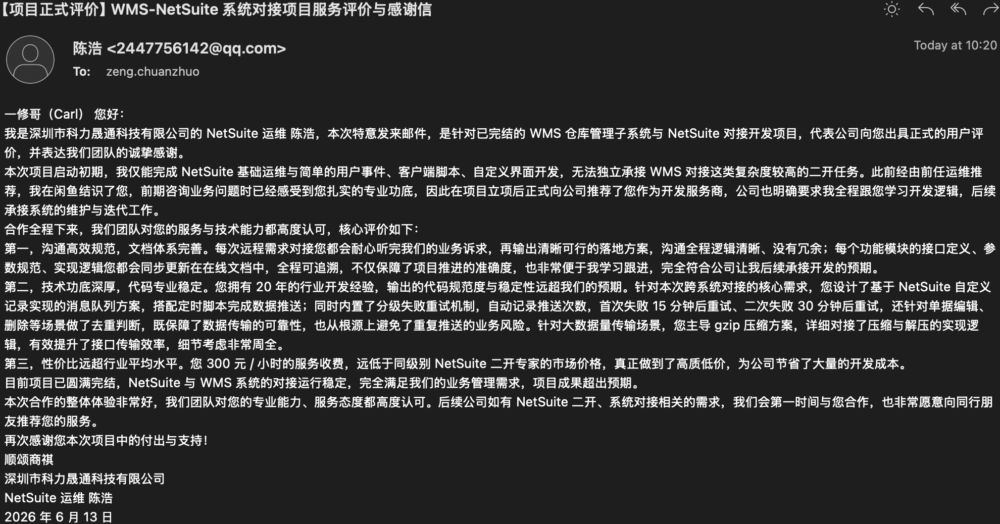
With more than ten years of hands‑on SuiteScript development experience, I maintains own reusable code library. My expertise covers business‑process optimization and third‑party system integrations, including RESTlet‑based data synchronization between WMS/TMS and NetSuite. Projects are billed by working hours, with complete online documentation covering requirements, development and testing. Full source code and technical deliverables are handed over to clients. I takes a pragmatic delivery‑first approach, minimizing heavy business overheads to resolve real‑world NetSuite digital‑transformation pain‑points for enterprises, and has received written testimonials from past clients for warehouse, inventory‑related, transportation management related customization work(WMS, TMS, ERP).
2009年-2012年: 北京图腾盛世科技有限公司
NetSuite Engineer, NetSuite ERP Development Engineer
//------------------------------------------------------------------
// Copyright 2018, All rights reserved, Carl Notes.
//
// No part of this file may be copied or used without express, written
// permission of Carl Notes.
//------------------------------------------------------------------

//------------------------------------------------------------------
//Script: ep_OperateInvCount_rl.js
//Developer: Carl
//Date: 20250808
//Description: API REST Endpoint: Operate Inventory Count
//             Running in nonpaged mode, per search upto 4000 results.
//
// ------------------------------------------------------------------

/**
 * @NApiVersion 2.1
 * @NScriptType Restlet
 */
define(['N/error', 'N/record', 'N/runtime', 'N/search'],
    /**
     * @param{error} error
     * @param{record} record
     * @param{runtime} runtime
     * @param{search} search
     */
    (error, record, runtime, search) => {
        /**
         * Defines the function that is executed when a GET request is sent to a RESTlet.
         * @param {Object} requestParams - Parameters from HTTP request URL; parameters passed as an Object (for all supported
         *     content types)
         * @returns {string | Object} HTTP response body; returns a string when request Content-Type is 'text/plain'; returns an
         *     Object when request Content-Type is 'application/json' or 'application/xml'
         * @since 2015.2
         */
        const get = (requestParams) => {

        }

        /**
         * Defines the function that is executed when a PUT request is sent to a RESTlet.
         * @param {string | Object} requestBody - The HTTP request body; request body are passed as a string when request
         *     Content-Type is 'text/plain' or parsed into an Object when request Content-Type is 'application/json' (in which case
         *     the body must be a valid JSON)
         * @returns {string | Object} HTTP response body; returns a string when request Content-Type is 'text/plain'; returns an
         *     Object when request Content-Type is 'application/json' or 'application/xml'
         * @since 2015.2
         */
        const put = (requestBody) => {

        }

        /**
         * Defines the function that is executed when a POST request is sent to a RESTlet.
         * @param {string | Object} requestBody - The HTTP request body; request body is passed as a string when request
         *     Content-Type is 'text/plain' or parsed into an Object when request Content-Type is 'application/json' (in which case
         *     the body must be a valid JSON)
         * @returns {string | Object} HTTP response body; returns a string when request Content-Type is 'text/plain'; returns an
         *     Object when request Content-Type is 'application/json' or 'application/xml'
         * @since 2015.2
         */
        const post = (requestBody) => {

            //Validate requestBody
            if (!requestBody.body || !requestBody.body.location||!requestBody.body.internalid||!requestBody.body.data) {

                error.create({
                    name: 'Invalid_Post_Data',
                    message: 'Please check documenation for validate Post data',
                    notifyOff: false
                });
                return '';
            }
            var objInvCountBd = requestBody.body;

            // Create Inventory Count
            var recInvCount = record.create({
                type: record.Type.INVENTORY_COUNT,
                isDynamic: false
            });

            recInvCount.setValue('location', objInvCountBd.location);
            recInvCount.setValue('account', 1423);
            recInvCount.setValue('custbody_wms_invcount_id', objInvCountBd.internalid);
            recInvCount.setValue('custbody_wms_invcount_user', requestBody.user);


            var arrInvCountItems = [];
            arrInvCountItems = objInvCountBd.data;

            for(var ln=0 ; arrInvCountItems && ln<arrInvCountItems.length; ln++){

                var objInvCountItm = arrInvCountItems[ln];

                recInvCount.setSublistValue({
                    sublistId: 'item',
                    fieldId: 'item',
                    value: objInvCountItm.item,
                    line: ln
                });
                recInvCount.setSublistValue({
                    sublistId: 'item',
                    fieldId: 'binnumber',
                    value: objInvCountItm.binnumber, //20 = 2.配件库位; 23 = 1. 成品库位
                    line: ln
                });

                arrInvCountItems[ln].line = ln;
            }
            recInvCount.setValue('custbody_wms_invcount_items', JSON.stringify(arrInvCountItems));

            var intInvCountId = recInvCount.save({
                enableSourcing: true
                // , ignoreMandatoryFields: true
            });
            log.audit('ep_OperateInvCount_rl', 'Created New Inventory Count: ' + intInvCountId);

            // return {
            //     code: 0,
            //     msg: '推送库存盘点单成功'
            // };
            return intInvCountId;
        }

        /**
         * Defines the function that is executed when a DELETE request is sent to a RESTlet.
         * @param {Object} requestParams - Parameters from HTTP request URL; parameters are passed as an Object (for all supported
         *     content types)
         * @returns {string | Object} HTTP response body; returns a string when request Content-Type is 'text/plain'; returns an
         *     Object when request Content-Type is 'application/json' or 'application/xml'
         * @since 2015.2
         */
        const doDelete = (requestParams) => {

        }

        return {
            // get: post,
            // , put,
            post: post
            // , delete: doDelete
        }

    });
/**
 * @NApiVersion 2.1
 * @NScriptType UserEventScript
 */
define(['N/action', 'N/error', 'N/record', 'N/runtime', 'N/search'],

    (action, error, record, runtime, search) => {
        /**
         * Defines the function definition that is executed before record is loaded.
         * @param {Object} scriptContext
         * @param {Record} scriptContext.newRecord - New record
         * @param {string} scriptContext.type - Trigger type; use values from the context.UserEventType enum
         * @param {Form} scriptContext.form - Current form
         * @param {ServletRequest} scriptContext.request - HTTP request information sent from the browser for a client action only.
         * @since 2015.2
         */
        const beforeLoad = (scriptContext) => {

        }

        /**
         * Defines the function definition that is executed before record is submitted.
         * @param {Object} scriptContext
         * @param {Record} scriptContext.newRecord - New record
         * @param {Record} scriptContext.oldRecord - Old record
         * @param {string} scriptContext.type - Trigger type; use values from the context.UserEventType enum
         * @since 2015.2
         */
        const beforeSubmit = (scriptContext) => {

        }

        /**
         * Defines the function definition that is executed after record is submitted.
         * @param {Object} scriptContext
         * @param {Record} scriptContext.newRecord - New record
         * @param {Record} scriptContext.oldRecord - Old record
         * @param {string} scriptContext.type - Trigger type; use values from the context.UserEventType enum
         * @since 2015.2
         */
        const afterSubmit = (scriptContext) => {

            var currentRecord = scriptContext.newRecord;
            var intInvCountId = currentRecord.id;

            //flag for restlet API transaction
            if (!currentRecord.getValue('custbody_wms_invcount_id'))
                return true;

            //only available for RESTLET
            if (runtime.executionContext != runtime.ContextType.RESTLET)
                return true;

            if (!currentRecord.getValue('status')||
                currentRecord.getValue('status') == 'Open' || currentRecord.getValue('statuskey') == 'A') {

                action.execute({
                    id: 'startcount',
                    recordType: currentRecord.type,
                    params: {
                        recordId: currentRecord.id
                    }
                });

                //re-enter the quantity and count detail
                recInvCount = record.load({
                    type: record.Type.INVENTORY_COUNT,
                    id: intInvCountId
                })


                var strItemData = recInvCount.getValue('custbody_wms_invcount_items');
                var arrInvCountItems = JSON.parse(strItemData);
                var arrLinkedArrIdx = [];

                for(var i=0 ; arrInvCountItems && i<arrInvCountItems.length; i++){

                    var objInvCountItm = arrInvCountItems[i];

                    var intItemId_tmp = recInvCount.getSublistValue({
                        sublistId: 'item',
                        fieldId: 'item',
                        line: i
                    });
                    var intItemBin_tmp = recInvCount.getSublistValue({
                        sublistId: 'item',
                        fieldId: 'binnumber',
                        line: i
                    });

                    if (objInvCountItm.item!=intItemId_tmp || objInvCountItm.binnumber!=intItemBin_tmp)
                        continue;


                    // countdetail  --------------------------
                    var intQtyTtl = 0;
                    var arrCountDtl = objInvCountItm.info;

                    var objCountDtl = recInvCount.getSublistSubrecord({
                        sublistId: 'item',
                        fieldId: 'countdetail',
                        line: i
                    });

                    for(var countDtlIdx=0 ; arrCountDtl && countDtlIdx<arrCountDtl.length; countDtlIdx++){

                        objCountDtl.setSublistValue({
                            sublistId: 'inventorydetail',
                            fieldId: 'inventorynumber',
                            value: arrCountDtl[countDtlIdx].inventorynumber,//'Test20250812',
                            line: countDtlIdx
                        });
                        objCountDtl.setSublistValue({
                            sublistId: 'inventorydetail',
                            fieldId: 'inventorystatus',
                            value: arrCountDtl[countDtlIdx].inventorystatus,//'1',
                            line: countDtlIdx
                        });
                        objCountDtl.setSublistValue({
                            sublistId: 'inventorydetail',
                            fieldId: 'quantity',
                            value: arrCountDtl[countDtlIdx].inventorycount,//'999',
                            line: countDtlIdx
                        });

                        intQtyTtl = intQtyTtl + arrCountDtl[countDtlIdx].inventorycount;
                    }

                    recInvCount.setSublistValue({
                        sublistId: 'item',
                        fieldId: 'countquantity',
                        value: intQtyTtl,
                        line: i
                    });

                }

                var intInvCountId = recInvCount.save();
                log.audit('wms_invCount_ue', 'Updated New Inventory Count: ' + intInvCountId);

                action.execute({
                    id: 'completecount',
                    recordType: currentRecord.type,
                    params: {
                        recordId: currentRecord.id
                    }
                });

                action.execute({
                    id: 'approve',
                    recordType: currentRecord.type,
                    params: {
                        recordId: currentRecord.id
                    }
                });

            }

            return true;
        }

        return {
            // beforeLoad, beforeSubmit,
            afterSubmit
        }

    });
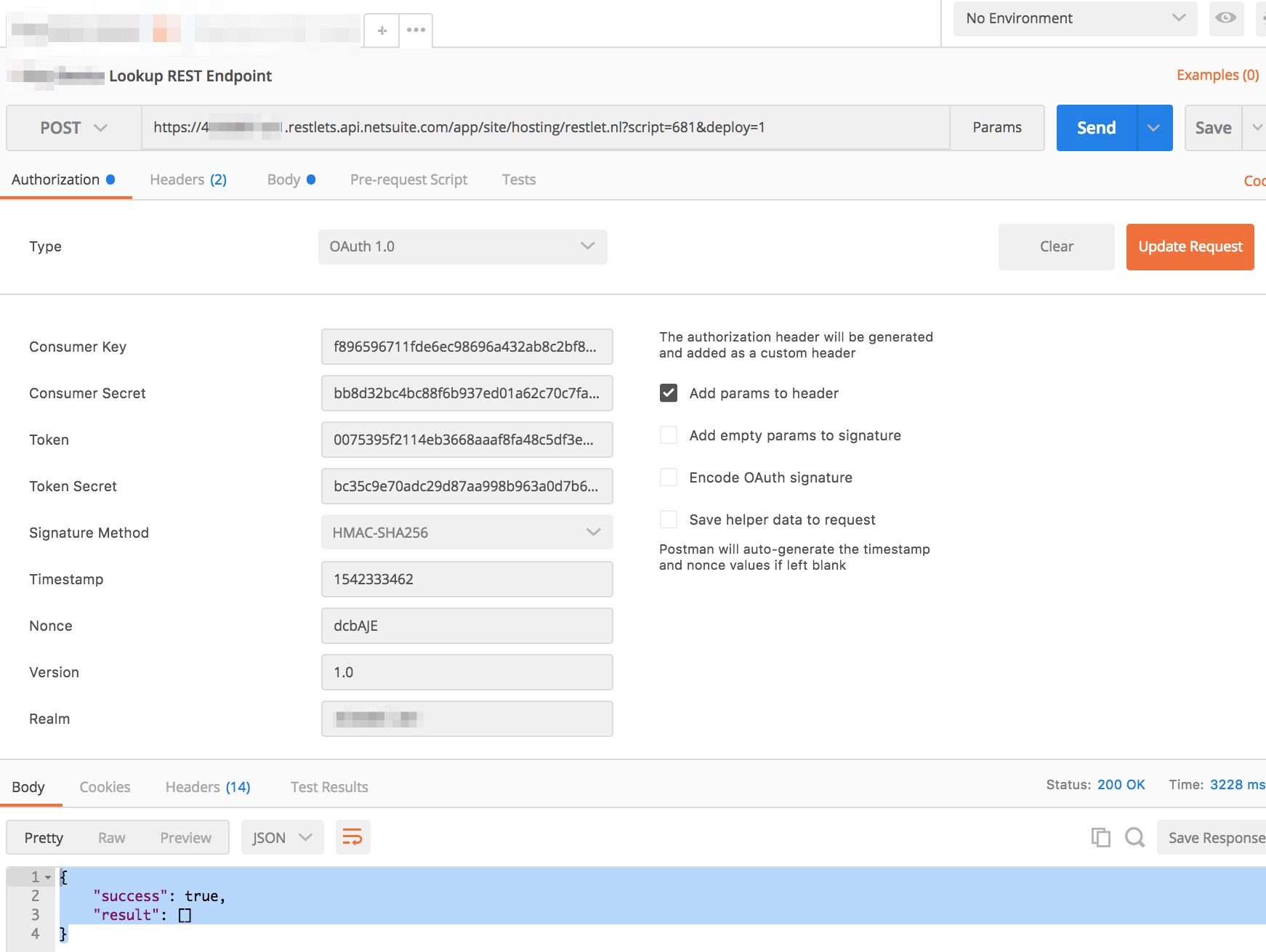
POSTMAN及设置
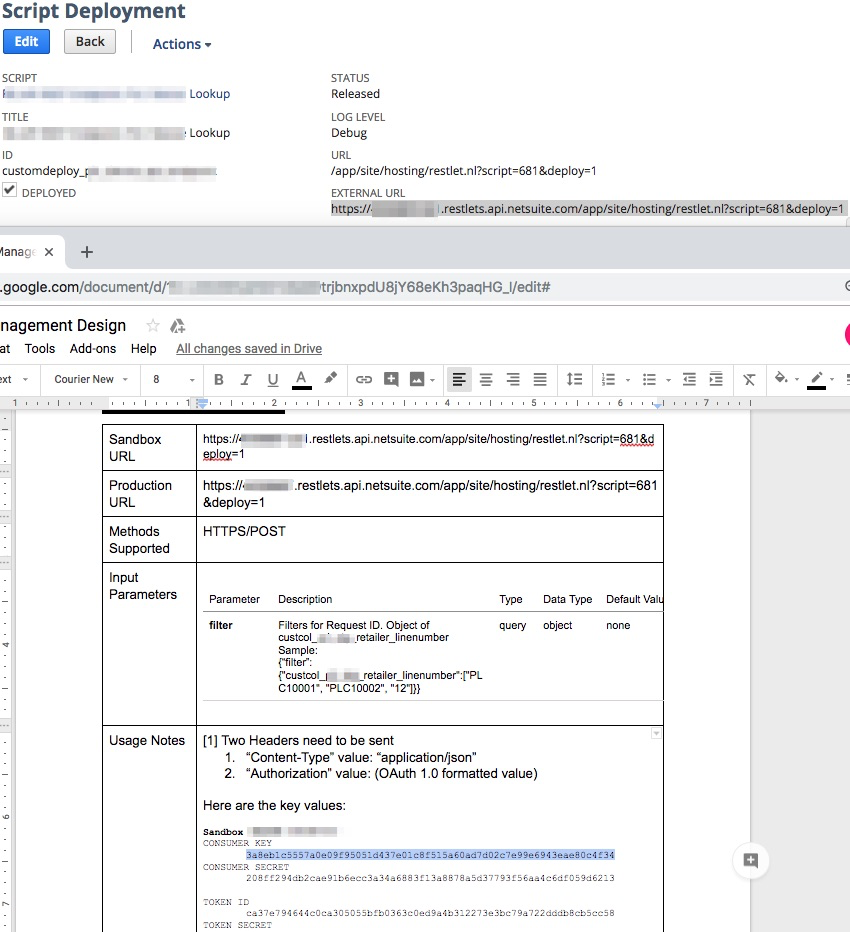
oAuth 1.0 的设置中, 有个需要注意的地方: 把NetSuite Account ID 放到 header的 Realm 字段中. In Postman in your request tab and then in the authorization tab in the advanced section there is a field called Realm. Put the account id in the realm field with underscores.
* Replace the URL FROM * https://maxcdn.bootstrapcdn.com/bootstrap/4.5.2/js/bootstrap.min.js
* https://maxcdn.bootstrapcdn.com/bootstrap/4.5.2/css/bootstrap.min.css
* TO * https://cdn.bootcdn.net/ajax/libs/twitter-bootstrap/4.5.2/js/bootstrap.min.js
* https://cdn.bootcdn.net/ajax/libs/twitter-bootstrap/4.5.2/css/bootstrap.min.css
JSZip-Sync is a Javascript library created for creating, reading and editing .zip files in a simple way.
JSZip is a javascript library for creating, reading and editing .zip files, with a lovely and simple API.
We provide people-friendly NetSuite development and consulting services for all sizes of business and projects.
We specialize in customizing NetSuite to better fit your specific business processes. Our philosophy is that in everything we do, people are the most important aspect. We believe that NetSuite is an incredible system and our goal is to help your company utilize NetSuite to its greatest potential, delivering you incredible value.
服务流程
服务内容
服务案例
Signatures for NetSuite
Signatures for NetSuite is a “Built-for-NetSuite” approved eSignature tool that enables you to sign any record in NetSuite. Users can sign using a touchscreen (Chromebook, iPad, etc.), mouse, or Topaz USB signature pad. Screenshots:
Automated Process Testing
This modules gives users the ability to create test cases in NetSuite for their processes. The test cases can be run automatically (on a schedule) so that administrators can find out when something changes or something breaks.
SMS (Text Messaging) Integration
What would having automated SMS communication to and from NetSuite enable you to do? The possibilities are endless, but a few of the examples that the tools in this bundle enable you to do are: appointment reminders, quote approvals, shipment notifications, and bulk customer satisfaction surveys.
Easy Payment Suitelet
This tool enables your customers to pay their invoices securely online (via NetSuite) without having to log into anything
Easy Sale Suitelet
This tool enables users to easily make purchases online from a simple product catalog, resulting in a sales order or cash sale in your NetSuite.
Matrix Item Entry
For clothing companies, the standard NetSuite item entry process on an order can be slow and tedious. Use this simple tool to quickly enter matrix items organized by standard size scales (S-M-L-XL-XXL, etc).
Advanced Reporting Requirements
Are you having trouble getting the data you need from a report or saved search? We can help create advanced saved searches or visual data representation using the new SuiteAnalytics module.
Contract Renewals
We’ve done a lot of work with software companies to automate and enhance managing contracts and contract items. If you’re experiencing challenges or process bottlenecks with contracts in NetSuite, get in touch and let’s talk through it.
Advanced PDF Templates
Need some highly-tailored PDF printout templates created? We are experts in Freemarker templates and BFO PDF creation.
State: [optiona可选]This can be any random string of ASCII characters. It must include at least 22 characters.
Pass By: Headers
Client Authentication: Send as Basic Auth header
点击 Request Token/Get New Access Token
工具会打开的授权页面, 确认登陆
如果当前浏览器是已登陆NetSuite的状态, 会自动跳转到如下画面, 直接进行授权确认
点击Continue后, NetSuite会传一个post到指定的节点用于完成确认
如果你需要一个你当前系统的rest的sample, 你在登陆系统的状态下可以下载到
You can download the REST API Postman environment template and collection of sample requests from the SuiteTalk tools download page at https://.app.netsuite.com/app/external/integration/integrationDownloadPage.nl.
| Request Parameter | Description |
| —————– | ———————————————————— |
| response_type | The value of the response_type parameter is always code. |
| client_id | Identifies the client.The value of the client ID is provided when the integration record is created. |
| redirect_uri | The application uses the valid redirect URI to handle the authorization code.The value of the redirect URI parameter must match the redirect URI in the corresponding integration record. 这里面的内容要encode encodeURIComponent(‘https://hoppscotch.io/oauth’) |
| scope | The scope for which the application is requesting access. Values are restlets, rest_webservices, suite_analytics, or mcp. You can use any combination of the scopes, except the mcp. The mcp value for the scope parameter can only be used on its own. For more information about the NetSuite AI Connector Service, see Connect to NetSuite AI Connector Service. |
| 举例说明: | 注意下面的例子要根据你实际情况调整 |
| | https://.app.netsuite.com/app/login/oauth2/authorize.nl?response_type=code&redirect_uri=https%3A%2F%2Fhoppscotch.io%2Foauth&scope=rest_webservices&client_id=e184757ca95d8f73160983f17d01337d65d74149cc858e839df184a26aa3597e |
After authorization, NetSuite initiates a redirect to the Redirect URI, with the following parameters:
| Redirect Parameter | Description |
| —————— | ———————————————————— |
| state | The state parameter in the redirect matches the state parameter in the request in Step One.ImportantTo avoid cross-site request forgery (CSRF) attacks, you must conform to the OAuth 2.0 specification. For more information, see RFC6749 Section 10.12. |
| code | A randomly generated string that is used for request verification in Step Two.The code parameter is only generated if the application was authorized.You must use the value of the code parameter immediately after it is generated. The value for the code parameter has limited time validity. |
| role | Indicates the user’s role for which the access token and refresh token are granted in Step Two.The role parameter is a NetSuite-specific parameter. |
| entity | The ID of the user who authorizes the application or interrupts the flow.The entity parameter is a NetSuite-specific parameter. |
| company | NetSuite account ID (company identifier).The company parameter is a NetSuite-specific parameter. |
| error | The error parameter is only used when an error occurs during the flow. For information about error values, see Troubleshooting OAuth 2.0. |
| Request Parameter | Description |
| —————– | ———————————————————— |
| code | 这是第一个get跳转后获取到的code. The code parameter value obtained in Step One. |
| redirect_uri | 这是后台校验用的, redirect_uri必需吻合NetSuite Integration记录中的设置, 和第一个发送的redirect_uri参数内容. The value of the redirect_uri parameter must match the value entered in the corresponding integration record and the value in the request in Step One. |
| grant_type | 这是固定内容authorization_code The value of the grant_type parameter in Step Two is authorization_code. |
| code_verifier | 必须吻合第一步中放回的code_verifier参数内容。The value of the code_verifier must match the value generated in Step One. If the values don’t match, HTTP 400 Bad Response error is returned. For more information, see https://tools.ietf.org/html/rfc7636, sections 4.5 and 4.6. |
Request parameters must be encoded based on the HTML specification for the application/x-www-form-urlencoded media type. For more information, see URL Specification 5.1
The client authentication method used in the header of the request follows the HTTP Basic authentication scheme. For more information, see RFC 7617. The format is clientid:clientsecret. The string value is Base64url encoded. The following code provides an example.
| JSON Response Fields | Description |
| ——————– | ———————————————————— |
| access_token | The value of the access_token parameter is in JSON Web Token (JWT) format. The access token is valid for 60 minutes. |
| refresh_token | The value of the refresh_token parameter is in JSON JWT format. The refresh token is valid for seven days.ImportantIf you use public clients for OAuth 2.0, the refresh token is only valid for two days by default and is for one-time use only. You can change this value on the integration record. The accepted values are between one hour and 720 hours (thirty days in hours). |
| expires_in | The value of the expires_in parameter is always 3600. The value represents the time period during which the access token is valid, in seconds. |
| token_type | The value of the token_type parameter is always bearer. |
| id_token | This parameter is a part of OAuth 2.0, but it is used only in the NetSuite as OIDC Provider feature flow. You don’t need to configure the token_id parameter as a part of the OAuth 2.0 feature flow. For more information, see Step Two POST Request to the Token Endpoint. |
/**
             * Function to be executed after page is initialized.
             *
             * @param {Object}
             *            scriptContext
             * @param {Record}
             *            scriptContext.currentRecord - Current form record
             * @param {string}
             *            scriptContext.mode - The mode in which the record is
             *            being accessed (create, copy, or edit)
             *
             * @since 2015.2
             */
function pageInit(scriptContext) {

  ...

    // Bind select option change event
    var clsProjectDropDown = new CLLIB.PROJECTDROPDOWN(intEntityId,
          objDropdownDom, {'currentRecord': currentRecord});
    clsProjectDropDown.bindSelectEvent();

  ...
}
fieldChanged
function fieldChanged(scriptContext) {
  switch (scriptContext.fieldId) {

  case ....

      // Bind select option change event
      var clsProjectDropDown = new CLLIB.PROJECTDROPDOWN(
            intEntityId, objDropdownDom, {'currentRecord': currentRecord});

      if (!intEntityId) {
         clsProjectDropDown.clearSelectOptions();
         return true;
      }

      // Draw entity project dropdown options
      clsProjectDropDown.drawDOM();
        break;
    }
}
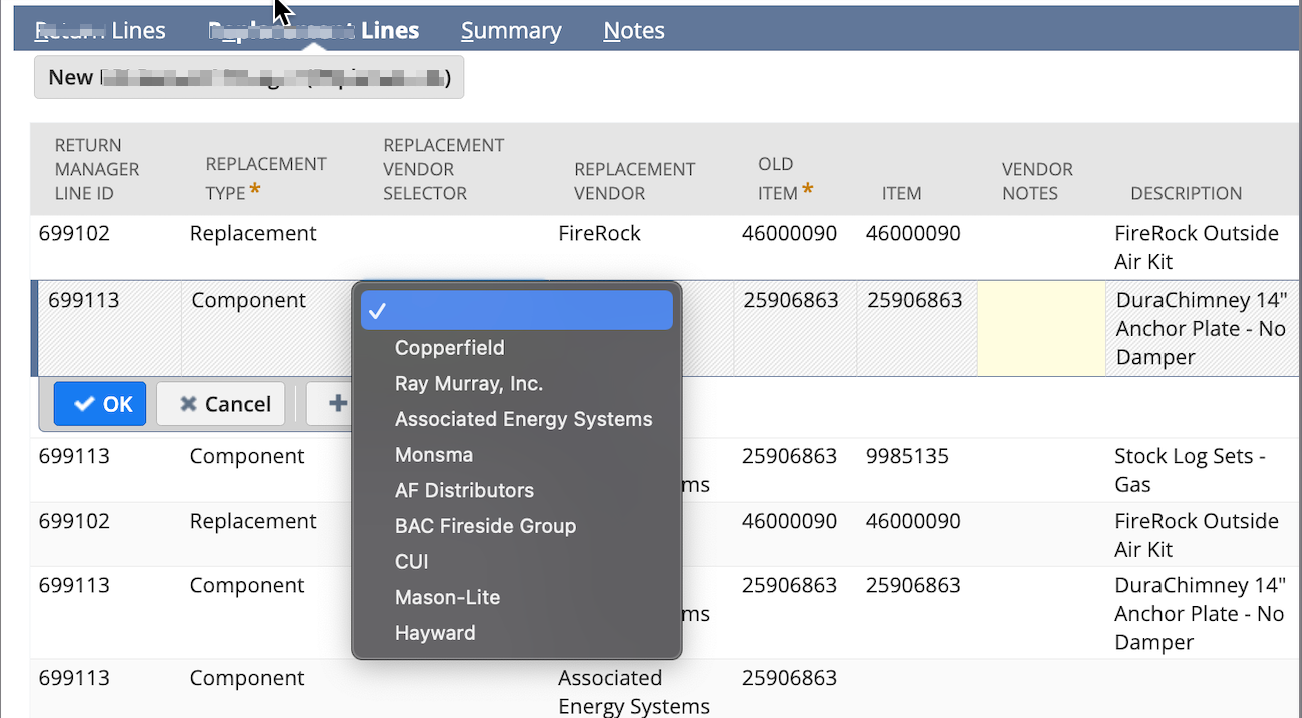
pri_RetMgr_vendor_refreshSelectOption
function pri_RetMgr_vendor_refreshSelectOption(currentRecord) {

    var lnIdx = currentRecord.getCurrentSublistIndex({
        sublistId: strSublistId_replc
    });
    var intItemId = currentRecord.getCurrentSublistValue(strSublistId_replc, RETMGRLIB.REC_RETURNMGR_REPLC_LINE.ITEM);
    var intVendorId_cur = currentRecord.getCurrentSublistValue(strSublistId_replc, RETMGRLIB.REC_RETURNMGR_REPLC_LINE.VENDOR);

    try {

        var objDropdownDom = document.getElementById('recmachcustrecord_pri_return_mgr_replc_parent_custrecord_pri_return_mgr_replc_selvnd_fs');
        // Bind select option change event
        var clsVendorDropDown = new DDLIB.DROPDOWN(intItemId, objDropdownDom, {'currentRecord': currentRecord});
        jQuery('#recmachcustrecord_pri_return_mgr_replc_parent_custrecord_pri_return_mgr_replc_selvnd_fs').html(clsVendorDropDown.initOptionHtml(intVendorId_cur));
        clsVendorDropDown.bindSelectEvent();

    } catch (ex) {
        console.log(ex);
    }

    // Special case: After you change the item from Item A to Item B, the original vendor value should/might be cleared(since that vendor is not in new Item B’s vendor list)
    if (intVendorId_cur) {
        var bolVendorAvailable = false;
        var arrProjectResObj = clsVendorDropDown.arrProjectResObj;
        for (var i = 0; arrProjectResObj && i < arrProjectResObj.length; i++) {

            if (intVendorId_cur == arrProjectResObj[i].ID){
                bolVendorAvailable = true;
                break;
            }
        }
        if (bolVendorAvailable === false)
            currentRecord.setCurrentSublistValue({
                sublistId: strSublistId_replc,
                fieldId: RETMGRLIB.REC_RETURNMGR_REPLC_LINE.VENDOR,
                value: ''
            });
    }
}
从这个函数可以得知这个自定义的动态下拉字段,初始化的值也是会被加载的,非常顺滑。
Library – PRI_DropDown_lib.js
used in both Client and UserEvent/Server side. 核心公共函数库
//------------------------------------------------------------------
//Developer: Carl
//Description: Need a dynamic Drop Down on the record/transaction of vendor list.
// Thus, the drop down on record/transaction should filter for item that are related.
//------------------------------------------------------------------

/**
 * @NApiVersion 2.x
 * @NModuleScope Public
 */
define(
    ['N/error', 'N/record', 'N/runtime', 'N/search', './PRI_RM_ReturnManager_lib'],
    /**
     * @param {error}
     *            error
     * @param {record}
     *            record
     * @param {runtime}
     *            runtime
     * @param {search}
     *            search
     * @param {dialog}
     *            dialog
     */
    function (error, record, runtime, search, RETMGRLIB) {

        // ---------------------- Drop Down Class-----------------
        function DROPDOWN(intItemId, objDropdownDom, options) {

            this.intItemId = intItemId;
            this.objDropdownDom = objDropdownDom;

            if (intItemId) {

                this.arrProjectResObj = this.lookupVendorRecords();
            }

            this.strInitSelectFld = "<select id="custpage_projectdropdown" name="custpage_projectdropdown" autocomplete="off" lineindex="1" class="input uir-custom-field">"
                + "<option value=""> </option>"
                + 'REPLACE_OPTIONAL_HTML' + "</select>";

            if (options && typeof (options.currentRecord) != 'undefined') {
                this.currentRecord = options.currentRecord;
            }

        }

        /**
         * lookup Vendor Records
         *
         * @param {String}
         *            strLookupKeyWord Lookup Keyword
         * @returns {Object} objOrderStatusSublist
         */
        DROPDOWN.prototype.lookupVendorRecords = function (strLookupKeyWord) {

            var intItemId = this.intItemId;

            if (!intItemId)
                return [];

            var arrProjectRes = [];
            var objFilters = [['isinactive', 'is', 'F']];
            // if (intItemId) {
            //  objFilters.push('and');
            //  objFilters.push([ RETMGRLIB.REC_PRIPROJECT.CUSTOMER, 'anyof',
            //          [ intItemId ] ]);
            // }
            objFilters.push('and');
            objFilters.push(['internalid', 'anyof', [intItemId]]);
            var objColumns = ['itemid', 'displayname', 'othervendor', 'cost'];
            objColumns.push({name: "internalid", join: "vendor"});

            var objRecordRes = search.create(
                {
                    type: 'item',
                    filters: objFilters,
                    columns: objColumns
                }).run().getRange({
                start: 0,
                end: 1000
            });

            for (var i = 0; objRecordRes && i < objRecordRes.length; i++) {

                arrProjectRes.push({
                    ID: objRecordRes[i].getValue({
                        name: "internalid",
                        join: "vendor"
                    }),
                    // NAME: objRecordRes[i].getValue('itemid'),
                    COST: objRecordRes[i].getValue('cost'),
                    VALUE: objRecordRes[i].getText('othervendor')
                });
            }

            return arrProjectRes;
        };

        /**
         * Dynamically clear select options
         *
         * @returns {Boolean}
         */
        DROPDOWN.prototype.clearSelectOptions = function () {

            jQuery("#custpage_projectdropdown").replaceWith(
                this.strInitSelectFld.replace('REPLACE_OPTIONAL_HTML',
                    ''));

            return true;
        };

        /**
         * Draw select option DOM element
         */
        DROPDOWN.prototype.drawDOM = function () {

            var objDropdownDom = this.objDropdownDom;
            var arrProjectResObj = this.arrProjectResObj ? this.arrProjectResObj : this.lookupVendorRecords();

            var strOptionHtml = '';
            for (var idx = 0; idx < arrProjectResObj.length; idx++) {
                strOptionHtml += '<option value="'
                    + arrProjectResObj[idx].ID
                    + '" data-status='
                    + arrProjectResObj[idx].COST
                    + ' title="'
                    + JSON.stringify(arrProjectResObj[idx]).replace(
                        /"/g, "'") + '">'
                    + arrProjectResObj[idx].VALUE + '</option>';
            }
            var strInitSelectFld = this.strInitSelectFld.replace(
                'REPLACE_OPTIONAL_HTML', strOptionHtml);

            jQuery("#custpage_projectdropdown").replaceWith(
                strInitSelectFld);

            this.bindSelectEvent();
        };

        /**
         * Bind Selection Operation <br>
         * Note: Only used in Client Side
         */
        DROPDOWN.prototype.bindSelectEvent = function () {

            jQuery(document).ready(
                function () {
                    jQuery("#custpage_projectdropdown").change(
                        function () {

                            // alert(jQuery(this).val());
                            nlapiSetCurrentLineItemValue('recmachcustrecord_pri_return_mgr_replc_parent', RETMGRLIB.REC_RETURNMGR_REPLC_LINE.VENDOR,
                                jQuery(this).val());

                            // var strStatus = jQuery(this).find(
                            // ":selected").data("status");
                        });
                });
        };

        /**
         * Initial Option HTML, can use in server side
         *
         * @param {integer}
         *            intDefSelectVal Default Contact record type Id
         * @param {string}
         *            strUserEventType User Event Type
         * @returns {string}
         */
        DROPDOWN.prototype.initOptionHtml = function (
            intDefSelectVal, strUserEventType) {

            // if (!this.intItemId)
            // return '';

            var arrProjectResObj = this.arrProjectResObj ? this.arrProjectResObj : this.lookupVendorRecords();

            var strOptionHtml = '';
            for (var idx = 0; idx < arrProjectResObj.length; idx++) {
                if (intDefSelectVal
                    && arrProjectResObj[idx].ID == intDefSelectVal)
                    strOptionHtml += '<option selected="selected" value="'
                        + arrProjectResObj[idx].ID
                        + '" data-status='
                        + arrProjectResObj[idx].COST
                        + ' title="'
                        + JSON.stringify(arrProjectResObj[idx])
                            .replace(/"/g, "'") + '">'
                        + arrProjectResObj[idx].VALUE + '</option>';
                else
                    strOptionHtml += '<option value="'
                        + arrProjectResObj[idx].ID
                        + '" data-status='
                        + arrProjectResObj[idx].COST
                        + ' title="'
                        + JSON.stringify(arrProjectResObj[idx])
                            .replace(/"/g, "'") + '">'
                        + arrProjectResObj[idx].VALUE + '</option>';
            }

            var strInitSelectFld = this.strInitSelectFld;
            if (strUserEventType == 'view')
                strInitSelectFld = strInitSelectFld.replace(
                    '<select id="custpage_projectdropdown"',
                    "<select id="custpage_projectdropdown" disabled");

            strInitSelectFld = strInitSelectFld.replace(
                'REPLACE_OPTIONAL_HTML', strOptionHtml);

            return strInitSelectFld;
        };

        return {
            DROPDOWN: DROPDOWN
        };

    });